MCP协议是Anthropic团队提出的一种智能体与外部工具/资源通信的通信方式,允许智能体与工具之间“上下文共享”。
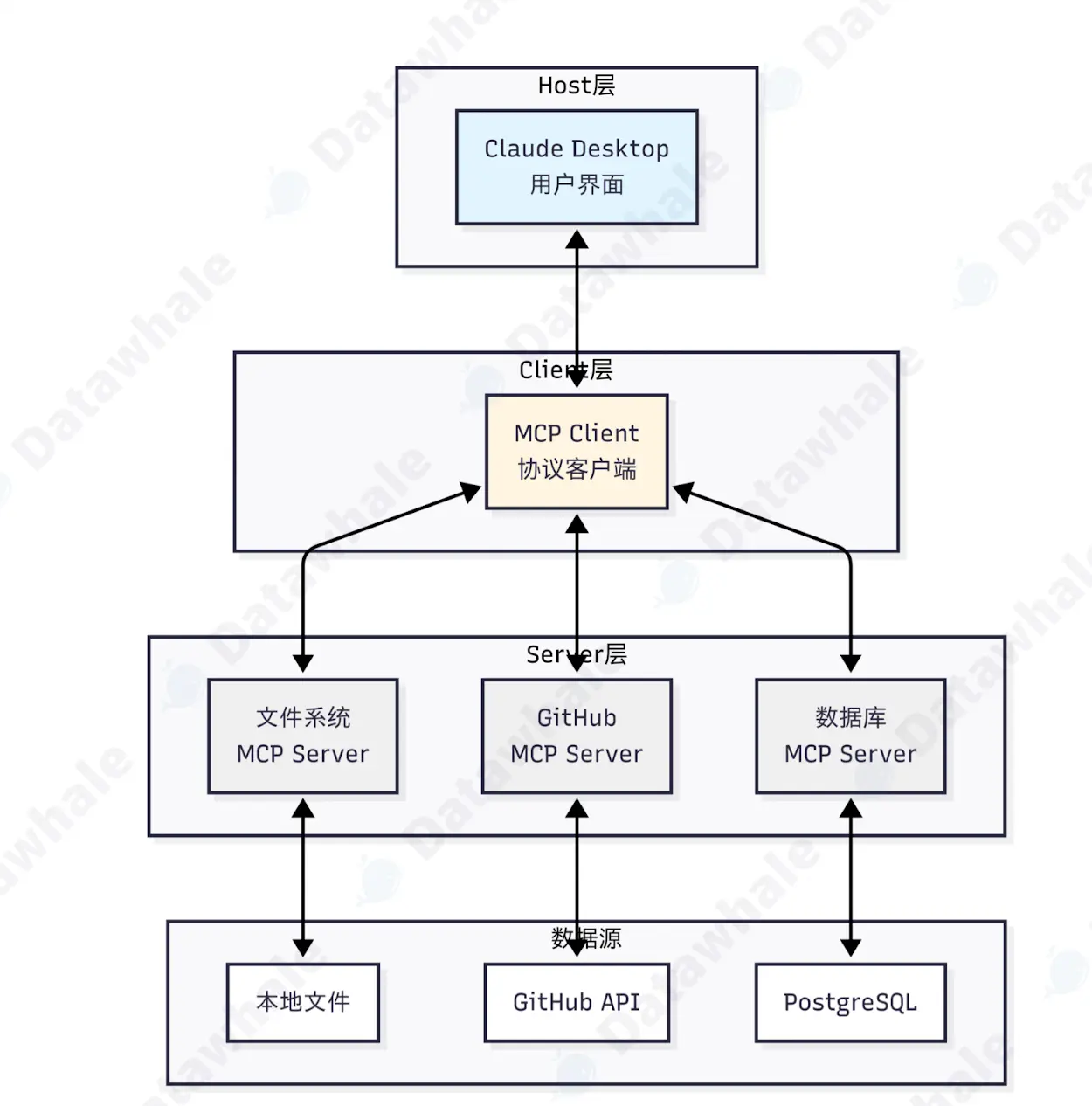
MCP协议采用 Host Client Servers三层架构设计。
- Host(宿主层):负责接收用户提问并与LLM进行交互,是用户直接交互的界面。
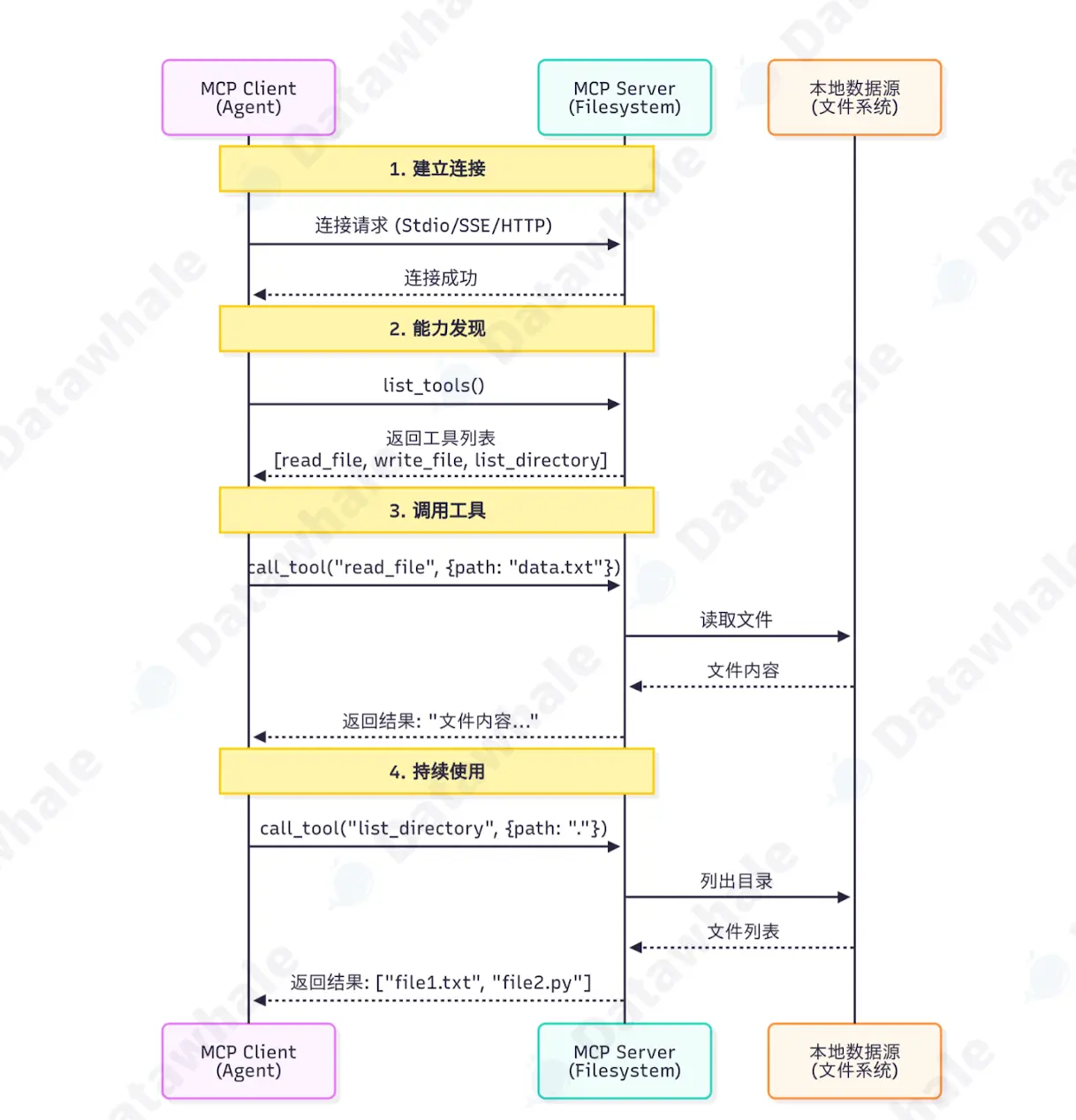
- Client(客户端层):当模型需要访问MCP时,Host内置的MCP Client被激活,Client负责与MCP server建立连接,发送请求并接收响应。
- Server(服务器层):服务器负责执行具体的工具调用。
MCP的核心能力
MCP提供三大可共享的核心能力:Tools、Resources、Prompts。

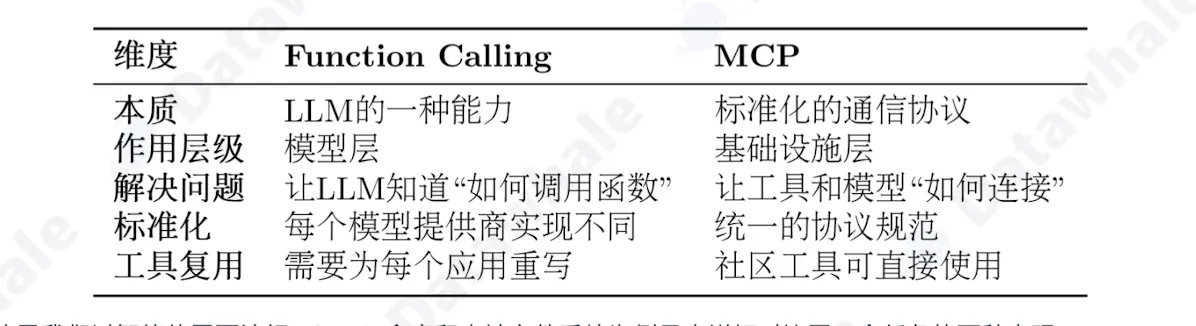
MCP与Function Call区别
Function Calls 示例
# 方式 1: 使用 Function Calling

# 步骤1: 为每个LLM提供商定义函数
# OpenAI格式
openai_tools = [
    {
        "type": "function",
        "function": {
            "name": "search_github",
            "description": "搜索GitHub仓库",
            "parameters": {
                "type": "object",
                "properties": {
                    "query": {"type": "string", "description": "搜索关键词"}
                },
                "required": ["query"]
            }
        }
    }
]

# Claude格式
claude_tools = [
    {
        "name": "search_github",
        "description": "搜索GitHub仓库",
        "input_schema": {  # 注意:不是parameters
            "type": "object",
            "properties": {
                "query": {"type": "string", "description": "搜索关键词"}
            },
            "required": ["query"]
        }
    }
]

# 步骤2: 自己实现工具函数
def search_github(query):
    import requests
    response = requests.get(
        "https://api.github.com/search/repositories",
        params={"q": query}
    )
    return response.json()

# 步骤3: 处理不同模型的响应格式
# OpenAI的响应
if response.choices[0].message.tool_calls:
    tool_call = response.choices[0].message.tool_calls[0]
    result = search_github(**json.loads(tool_call.function.arguments))

# Claude的响应
if response.content[0].type == "tool_use":
    tool_use = response.content[0]
    result = search_github(**tool_use.input)
MCP 示例
# 方式 2: 使用 MCP
from hello_agents.protocols import MCPClient

# 步骤1: 连接到社区提供的MCP服务器(无需自己实现)
github_client = MCPClient([
    "npx", "-y", "@modelcontextprotocol/server-github"
])

fs_client = MCPClient([
    "npx", "-y", "@modelcontextprotocol/server-filesystem", "."
])

# 步骤2: 统一的调用方式(与模型无关)

async with github_client:
    # 自动发现工具
    tools = await github_client.list_tools()

    # 调用工具(标准化接口)
    result = await github_client.call_tool(
        "search_repositories",
        {"query": "AI agents"}
    )

# 步骤3: 任何支持MCP的模型都能使用
# OpenAI、Claude、Llama等都使用相同的MCP客户端